

The right way to Login With Instagram using API in PHP, create Login With Instagram easily, tutorial & example PHP script for download.
Live Demo of Login With Instagram
Check live demo.
How To Create Login With Instagram In PHP
Very easy, using Instagram API and Qassim_HTTP() Function, we will create login with Instagram.
Register new Client ID
Go to Instagram Developer and register a new client.
Click on “Edit” button of your Client:
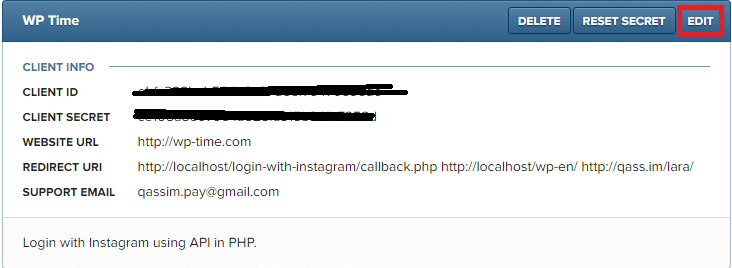
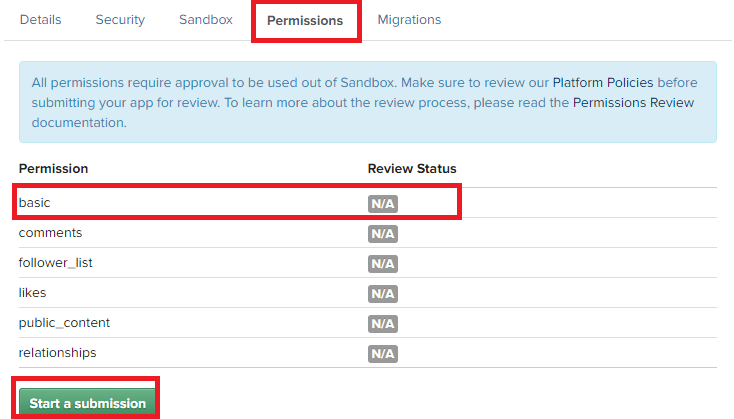
Now click on “Permissions” tab, we need “Basic” permission only, to get Basic Permission, contact Instagram, to contact him, click on “Start a submission” button, tell him you want “Basic” Permission.
After approved:
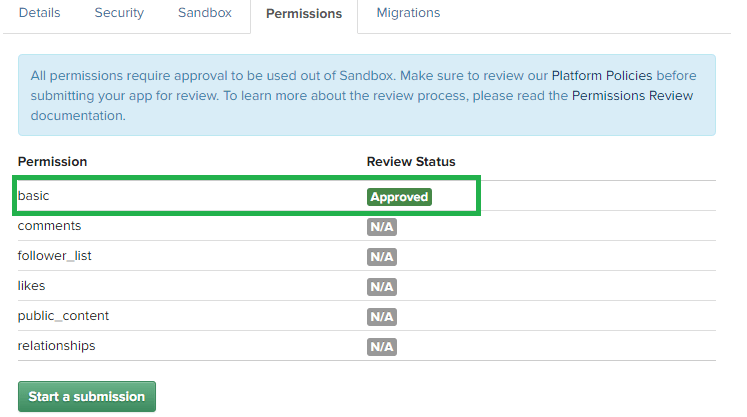
Now we can create login with Instagram.
Create Login With Instagram
We need 6 PHP files:
- config.php
- login.php
- Qassim_HTTP.php
- callback.php
- index.php
- logout.php
Create new PHP file “config.php” and enter this code inside it:
<?php

    // Script By Qassim Hassan, wp-time.com

    // go to https://www.instagram.com/developer/clients/register/ And register a new client

    $client_id = "XXXXXXX"; // enter your client id

    $client_secret = "XXXXXXX"; // enter your client secret

    $redirect_uri = "http://example.com/login-with-instagram/callback.php"; // enter your redirect url

?>
Create new PHP file “login.php” and enter this code inside it:
<?php

    session_start();

    // Script By Qassim Hassan, wp-time.com

    if( isset($_SESSION['user_info']) ){ // check if user is logged in
        header("location: index.php"); // redirect user to index page
        return false;
    }

    include 'config.php'; // include app info

    $_SESSION['login'] = 1;

    header("location: https://api.instagram.com/oauth/authorize/?client_id=$client_id&redirect_uri=$redirect_uri&response_type=code&scope=basic"); // redirect user to oauth page

?>
Now create new PHP file “Qassim_HTTP.php” and enter this code inside it:
<?php

/* Function By Qassim Hassan, wp-time.com */
function Qassim_HTTP($method, $url, $header, $data, $json){
if( $method == 1 ){
$method_type = 1; // 1 = POST
}else{
$method_type = 0; // 0 = GET
}

$curl = curl_init();
curl_setopt($curl, CURLOPT_URL, $url);
curl_setopt($curl, CURLOPT_RETURNTRANSFER, 1);
curl_setopt($curl, CURLOPT_SSL_VERIFYPEER, 0);
curl_setopt($curl, CURLOPT_HEADER, 0);

if( $header !== 0 ){
curl_setopt($curl, CURLOPT_HTTPHEADER, $header);
}

curl_setopt($curl, CURLOPT_POST, $method_type);

if( $data !== 0 ){
curl_setopt($curl, CURLOPT_POSTFIELDS, $data);
}

$response = curl_exec($curl);

if( $json == 0 ){
$json = $response;
}else{
$json = json_decode($response, true);
}

curl_close($curl);

return $json;
}

?>
Now create new PHP file “callback.php” and enter this code inside it:
<?php

    // Script By Qassim Hassan, wp-time.com

    session_start();

    if( isset($_SESSION['user_info']) or !isset($_SESSION['login']) ){ // if user is logged in
        header("location: index.php"); // redirect user to index page
        return false;
    }

    include 'Qassim_HTTP.php'; // include Qassim_HTTP() function

    include 'config.php'; // include app data

    $code = $_GET['code'];

    /* Get User Access Token */

    $method = 1; // method = 1, because we want POST method

    $url = "https://api.instagram.com/oauth/access_token";

    $header = 0; // header = 0, because we do not have header

    $data = array(
        "client_id" => $client_id,
        "client_secret" => $client_secret,
        "redirect_uri" => $redirect_uri,
        "grant_type" => "authorization_code",
        "code" => $code
    );

    $json = 1; // json = 1, because we want JSON response

    $get_access_token = Qassim_HTTP($method, $url, $header, $data, $json);

    $access_token = $get_access_token['access_token'];

    $get = file_get_contents("https://api.instagram.com/v1/users/self/?access_token=$access_token");

    $json = json_decode($get, true);

    $_SESSION['user_info'] = $json; // save user info in session

    header("location: index.php"); // redirect user to index page

?>
Now create new PHP file “index.php” and enter this code inside it:
<?php

    if( isset($_SESSION['user_info']) ){ // if user is logged in
        $user_info = $_SESSION['user_info']; // get user info array
        $full_name = $_SESSION['user_info']['data']['full_name']; // get full name
        $username = $_SESSION['user_info']['data']['username']; // get username
        $bio = $_SESSION['user_info']['data']['bio']; // get bio
        $ID = $_SESSION['user_info']['data']['id']; // get user id
        $website = $_SESSION['user_info']['data']['website']; // get user website
        $media_count = $_SESSION['user_info']['data']['counts']['media']; // get media count
        $followers_count = $_SESSION['user_info']['data']['counts']['followed_by']; // get followers
        $following_count = $_SESSION['user_info']['data']['counts']['follows']; // get following
        $profile_picture = $_SESSION['user_info']['data']['profile_picture']; // get profile picture
        ?>
            <h2>Welcome <?php echo $full_name; ?>!</h2>
            <p>Your username: <?php echo $username; ?></p>
            <p>Your bio: <?php echo $bio; ?></p>
            <p>Your website: <a href="<?php echo $website; ?>"><?php echo $website; ?></a></p>
            <p>Media count: <?php echo $media_count; ?></p>
            <p>Followers count: <?php echo $followers_count; ?></p>
            <p>Following count: <?php echo $following_count; ?></p>
            <p>Your ID: <?php echo $ID; ?></p>
            <p><img src="<?php echo $profile_picture; ?>"></p>
            <p><a href="logout.php">Logout?</a></p>
        <?php
    }

    else{ // if user is not logged in
        echo '<a href="login.php">Login With Instagram</a>';
    }

?>
Finally, create new PHP file “logout.php” and enter this code inside it:
<?php
    session_start();

    /* Script By Qassim Hassan, wp-time.com */

    // if user is logged in, destroy all facebook sessions
    if( isset($_SESSION['user_info']) or isset($_SESSION['login']) ){
        unset( $_SESSION['user_info'] ); // destroy
        unset( $_SESSION['login'] ); // destroy
        header("location: index.php"); // redirect user to index page
    }

    else{ // if user is not logged in
        header("location: index.php"); // redirect user to index page
    }

?>
Download
Download login with Instagram PHP Script and Live Demo example.
More
Check more Tutorials of Login with API.






sir.
I’m Php Developer.
we are integrating instagram login my website.
I study and followed your code step. I went to Instagram Developer and register a new client.
I got client id and secret key . That’s I can only login ..
But I want Every on should Login .
I got this Error:
{"code": 403, "error_type": "OAuthForbiddenException", "error_message": "You are not a sandbox user of this client"}.Read about Sandbox.
sir.
I read sandbox and I got permission Besic.
But It does not to public photo access and instagram also not support.
It demand brand and advertiser
Hey Qassim,
So I followed every step, but everytime when I login it stays stucked on the standard index.php saying “login with instagram”. I didn’t ask Permissions for basic information, but as far as I know sandbox already does this right?