
Simple wordpress function to get widgets count in your sidebar, two ways to get widgets count in theme sidebar, just 4 lines of code.
How To Get Widgets Count In Sidebar
We have two ways to get widgets count in sidebar, first way using wp_get_sidebars_widgets() function and count() function, second way using get_option() function and count() function.
First Way
Copy this code and paste it in your functions.php file:
function get_widgets_count( $sidebar_id ){
    $sidebars_widgets = wp_get_sidebars_widgets();
    return (int) count( (array) $sidebars_widgets[ $sidebar_id ] );
}
Now add this code to display count of widgets:
<?php
echo get_widgets_count( 'enter-sidebar-id' );
?>
Change ‘enter-sidebar-id’ to your Sidebar ID.
Second Way
Copy this code and paste it in your functions.php file:
function WPTime_get_widgets_count($sidebar_id){
    /* By Qassim Hassan, wp-time.com */
    $array = get_option('sidebars_widgets');
    return count($array[$sidebar_id]);
}
Now add this code to display count of widgets:
<?php
echo WPTime_get_widgets_count( 'enter-sidebar-id' );
?>
Change ‘enter-sidebar-id’ to your Sidebar ID, to get Sidebar ID, use this code:
<?php
print_r( get_option('sidebars_widgets') );
?>
Now you will get array of sidebars, like this:
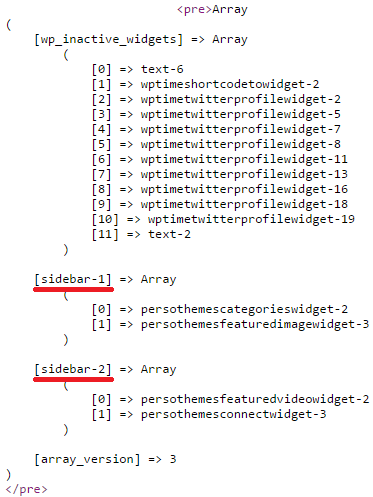
I have two sidebars, my first sidebar ID is “sidebar-1”, and my second sidebar ID is “sidebar-2”.